Different Layers of AI
There's layers to this thing
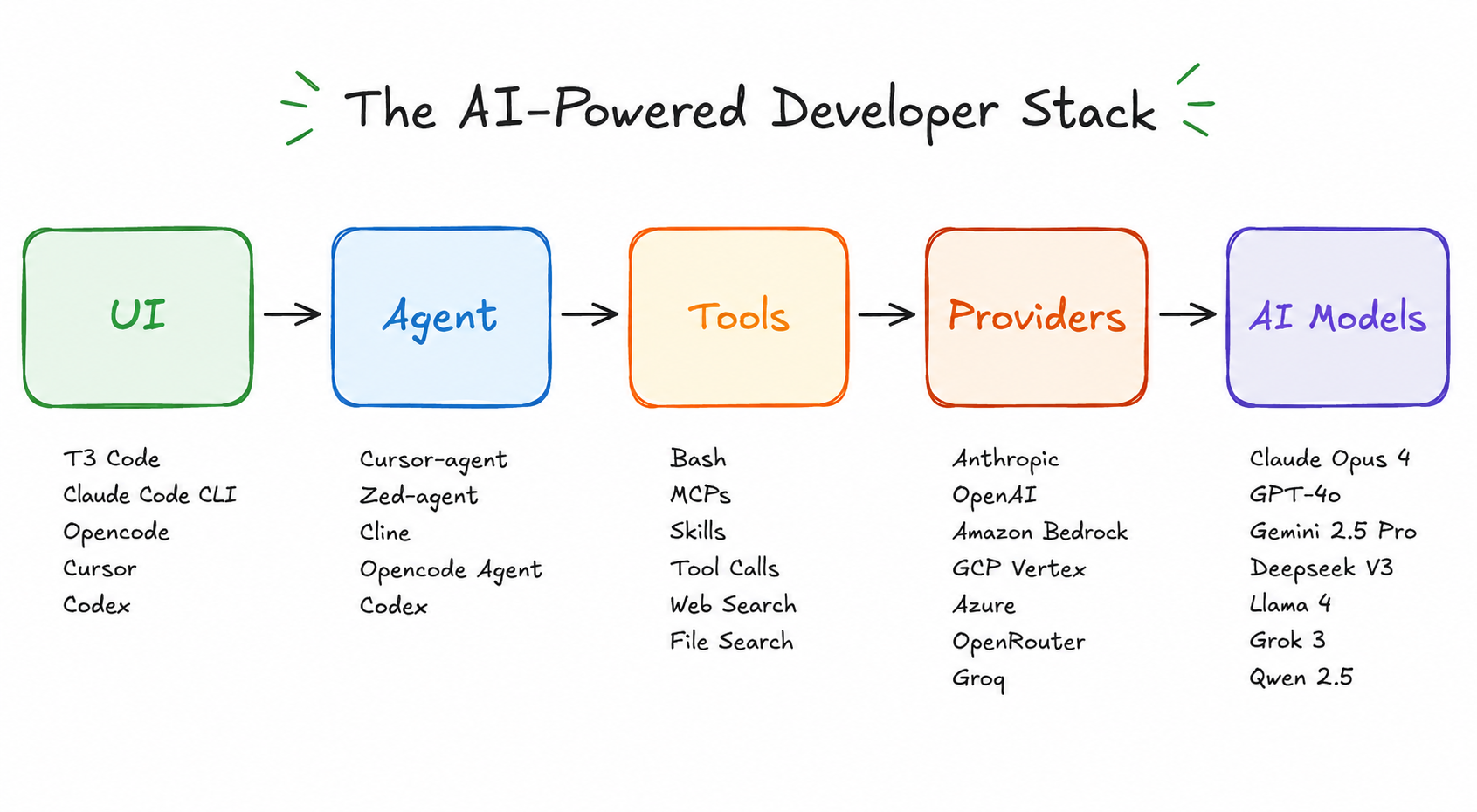
I want people to understand what they are using, so this blog is a dump of all the things I have learned while using these tools.
AI Models
These are LLMs, that just provide the statistically most probable next token in a non-deterministic way. They are very good at generating text and based on its capability, their world knowledge and reasoning ability can vary. It's important to know which model to use based on the complexity of the task and the amount of context you need to provide. There are three tiers of models:
- Fine
- Good
- Best
Fine Models
These are the models that are good for conversational tasks, where you don't need a lot of context and the task is not very complex. They are also good for tasks that require creativity, such as writing a story or a poem. Examples of fine models are:
- GPT mini/nano models
- Haiku models
Good Models
These are the models that are good for tasks that requires some level of context and reasoning ability. They are suffiecient for any byte sized task with a little bit of research and reasoning. These are the default models to which i give well-scoped tasks with proper context so they can reason and provide a good answer. Examples of good models are:
- GPT 5.5
- Sonnet Models
- Gemini Flash Models
Best Models
These are the models that are good for the most complex tasks that require a high level of context and reasoning ability. They are typically more expensive to use but provide the best results for challenging tasks. Examples of best models are:
- GPT 5.5
- Opus Models
- Gemini Pro Models
The usage of these models depends on the task at hand and the amount of context you need to provide. But these models are not the only determinant of the quality of the output, how do you use these models greatly depends which I'll talk about in later sections.
Providers
As a consumer, providers only matters for economic purpose. I would say the only deterministic factor in choosing a provider is the flexibility. Let's say i want to use an AI tool that requires me to submit an api key, if i go to open ai to use gpt models, its fine. but i want to try claude models, then i have to setup billing for anthropic and pay separately. Similarly in that case, I can use something like openrouter, where i have to setup billing once and use any model that i want. If there is a new model released, it'll be available in open router. But openrouter is pay as you go which means you have to pay for every token you use. On the other hand, each ai model company provide a subsidized subscription plan, where for a certain amount of money, you get a certain token usage ( which is usually a better deal ). the value props for these stuff changes so fast, but currently codex 20$ plan is the best deal.
Agents & Tools
The concept of Agents are fairly new, previously the availability of tools were sent to the models by inserting to its context and the models chose how to use them. But now with agents, you can define the behaviour of these models and how they should use the tools. This is a game changer because now you can have more control over the output of the models and how they interact with the tools. For example, you can define an agent that uses a search tool to find information on the internet and then uses that information to answer a question. This allows for more complex tasks to be performed by the models and also allows for more creativity in how the models can be used. So, well defined agents can greatly boose the output quality of models and the use of models can matter less and less if we have good agents. It also shifts the quality towards deterministic output, which is a good thing for most use cases. As for tools, initially mcp had a great hype. the concept of allowing llms to have access to tools was a game changer, but the implementation was not great. The setup was hard and having to run a separate server was not so good experience. MCP is dying down to some extent, but Skills are on rise. They can be defined as reusable prompts that can be used by agents to perform specific tasks.
User Interface
This is the most interesting space for me, as this greatly affects how well I can control the models and how well I can use the tools. A good user interface can make it easier to use the models and tools, while a bad user interface can make it harder to use them. For example, if I'm using a tool that requires me to input a lot of information, a good user interface can make it easier for me to input that information, while a bad user interface can make it harder for me to input that information. Similarly, if I'm using a model that requires me to provide a lot of context, a good user interface can make it easier for me to provide that context, while a bad user interface can make it harder for me to provide that context. So, the user interface is an important factor in how well I can use the models and tools, and it's something that I pay a lot of attention to when I'm using these tools. initiallly there was in build interface like github copilot and cursor, but claude code broke that stigma to be a cli tool. But now since there is limited usability of cli, people are coming around to gui/desktop apps to run agents.